
Make ERP no longer 'anti human': This design improves both employee efficiency and satisfaction
ERP system, as the core tool of enterprise digital transformation, should be the "right hand assistant" to improve management efficiency and reduce the burden of employees. However, in the process of actual implementation, many enterprises' ERP has become the "disaster area" that employees roast about - cumbersome operation, redundant process, confused interface, repeated data entry, disjunction between functions and actual needs, and even the embarrassing situation of "using ERP for the purpose of using ERP". This kind of "anti human" ERP design not only fails to improve work efficiency, but also increases the workload of employees, leading to serious resistance, frequent operational errors, and low data accuracy. It not only slows down the pace of enterprise digital transformation, but also reduces employees' job satisfaction and sense of belonging, ultimately greatly reducing the value of the ERP system. In fact, the "anti human" nature of ERP is not a problem with the system itself, but rather a design process that ignores the core needs of "people" and deviates from the actual business scenarios of the enterprise. Only by focusing on employee operating habits, adapting to actual business processes, and optimizing ERP design can ERP truly adapt to and serve employees, achieve dual improvement in employee efficiency and satisfaction, and enable digital tools to truly realize their value.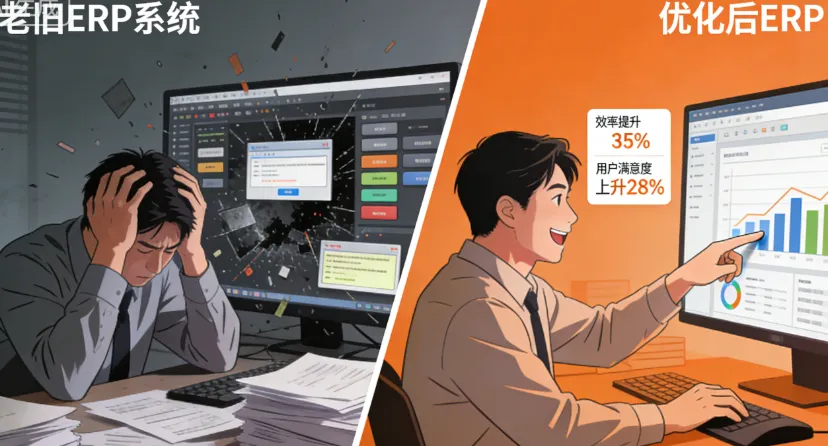
To optimize ERP design, the first step is to identify its core pain points that are "anti human" and clarify the root cause of the problem. Based on the pain points of ERP usage in many enterprises, the manifestation of "anti humanity" mainly focuses on four aspects, which are interrelated and form a vicious cycle. Firstly, the operation is cumbersome and redundant, with too much repetitive labor. Many ERP systems, in order to pursue "comprehensive functionality," have set up a large number of unnecessary operation steps, such as entering a purchase order, which requires jumping to multiple pages, filling in dozens of irrelevant information, and even repeatedly entering the same data in different modules. The work that could have been completed in a few minutes has been stretched to more than half an hour, which not only wastes employees' time but also erodes their patience. Secondly, the interface design is chaotic and the learning cost is too high. Part of the ERP interface layout is disorganized, with a pile of functional buttons, vague icon meanings, and confusing navigation logic. New employees need to spend weeks or even months proficiently operating it after joining, and old employees often delay their work because they cannot find the corresponding functions; Moreover, the interface is not compatible with mobile devices, making it difficult for employees to operate in a timely manner when they go out to work, and they can only go back to the computer to supplement data, seriously affecting work continuity.
Thirdly, there is a disconnect between functionality and actual business needs, and a one size fits all design ignores differentiated requirements. Many ERP systems are designed for general use without adapting to industry characteristics and actual business processes. For example, ERP systems in the manufacturing industry simply copy modules from the service industry, while ERP systems in the footwear industry lack targeted SKU and material management functions. This results in employees needing to frequently adapt and even manually enter data into the system after offline recording, making ERP an "additional burden"; At the same time, the system does not support personalized configuration, and employees in different positions need to face the same operating interface and functional modules. There are too many irrelevant functions, and useful functions are hidden too deeply, further reducing operational efficiency. Fourthly, there is a lack of feedback mechanism, and problems cannot be resolved in a timely manner. When employees encounter operational difficulties or system vulnerabilities during use, there is no convenient feedback channel and they can only report them layer by layer. The process is cumbersome and the resolution cycle is long; Part of the system updates and iterations are not timely, and known "anti human" issues have not been fixed for a long time. Employees are forced to adapt to unreasonable designs, and their resistance is increasing. They even intentionally avoid using ERP, resulting in distorted system data and inability to provide support for enterprise decision-making.
In addition, the "anti human" design of ERP also brings a series of hidden hazards: employees' resistance to emotions leads to an increase in operational errors, a decrease in data accuracy, and affects the scientificity of enterprise management decisions; Employees waste a lot of time on tedious operations, core work cannot be efficiently promoted, and overall work efficiency declines; Faced with unreasonable system design for a long time, employee job satisfaction decreases, a sense of belonging weakens, and even leads to the loss of core employees, indirectly increasing the company's labor costs; The value of ERP systems cannot be fully realized, and the investment in digital transformation of enterprises has become an "ineffective investment", missing out on opportunities for digital development. From this, it can be seen that optimizing ERP design and solving the pain points of "anti human" is not only the key to improving employee efficiency and satisfaction, but also the core prerequisite for making ERP realize its value and promoting digital transformation of enterprises.
To make ERP no longer "anti human", the core is to adhere to the principle of "employee centeredness and business orientation", based on operational convenience, user-friendly interface, functional adaptability, and timely feedback, to conduct comprehensive design optimization, so that ERP truly conforms to employee operating habits and adapts to the actual business of the enterprise, achieving the dual goal of "user-friendly for employees and user-friendly for the enterprise". By combining ERP optimization practices from different industries and enterprises of different scales, we can start from five core directions, which can quickly improve employee experience and work efficiency without requiring large investments.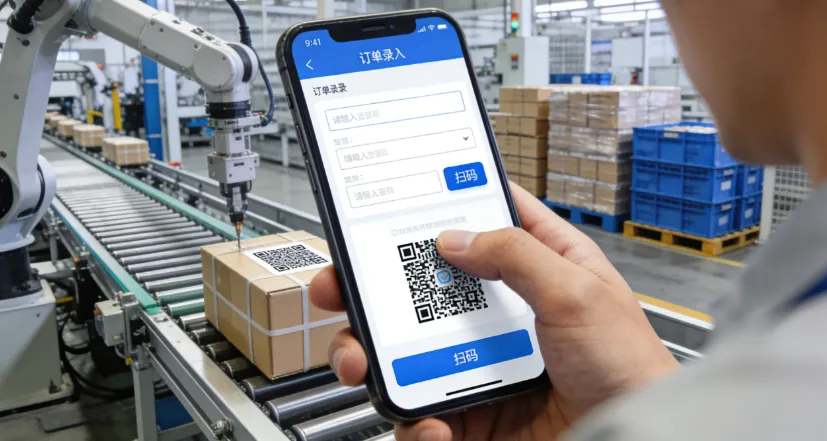
Optimization direction one: Simplify the operation process, reduce repetitive labor, and enable employees to "do less and do more". The tedious and redundant operations are the core pain point of ERP's "anti human" approach, and also the primary direction for optimization. When optimizing design, we should adhere to the principle of "simplification and efficiency", delete unnecessary operational steps, merge duplicate modules, and achieve "one-stop operation". For example, when entering a purchase order, supplier information and material information are automatically associated, without the need for employees to manually fill them in; After the same data is entered, it will be automatically synchronized to the relevant modules to avoid duplicate entries. For example, after the material receipt data is entered, it will be automatically synchronized to the inventory module and finance module, without the need for employees to enter separately in multiple modules; Set common operation shortcuts and template functions, such as commonly used order templates and report templates, which employees can directly call and modify, greatly saving operation time. After optimizing the ERP operation process of a manufacturing enterprise, the time for employees to enter orders has been shortened from 30 minutes to 5 minutes, and repetitive labor has been reduced by more than 70%. The employee's operational enthusiasm has significantly improved.
At the same time, the principle of "minimum necessary input" should be implemented, retaining only core required fields, and non essential information can be set as "optional input" to avoid employees being troubled by irrelevant information. For example, when entering finished product inventory information, the core required fields are product code, quantity, batch, and other non essential information such as the contact information of the warehouse personnel and notes. You can choose whether to enter them according to actual needs, which reduces both operational steps and input errors. In addition, AI technology can be introduced to achieve automatic data recognition and input, such as scanning codes to identify material codes and order numbers, and automatically filling in relevant information; By recognizing invoices and documents through OCR, financial data can be automatically entered, further reducing manual operations for employees and allowing them to devote more time to core work, thereby improving work efficiency.
Optimization direction 2: Optimize interface design, reduce learning costs, and enable employees to become familiar with it at a glance. The friendliness of interface design directly affects the user experience and learning cost of employees. The core of optimizing interface design is "simplicity, clarity, and ease of understanding", which conforms to the operating habits of employees. Firstly, streamline the interface layout, remove irrelevant function buttons, and place commonly used functions in prominent positions, such as placing "order entry", "inventory query", "data export" and other commonly used functions in the homepage navigation bar, so that employees can find them without jumping to multiple pages; Optimize navigation logic, adopting a design of "clear hierarchy and traceable path", allowing employees to quickly return to the previous page after clicking an error, avoiding getting lost. Secondly, unify the interface style, standardize the meaning of icons, font size, and color matching, avoid significant differences in interface styles between different modules, and reduce visual fatigue for employees; Icon design should be concise and clear, fitting the functional meaning, such as using the "shopping cart" icon to represent purchase orders and the "warehouse" icon to represent inventory management, so that employees can understand the meaning of the icons at a glance without the need for additional memory.
Thirdly, it is compatible with multiple terminals and supports synchronous operations on computers, mobile devices, and tablets. It optimizes the layout of the mobile interface, simplifies operation steps, and allows employees to quickly complete data entry, order queries, approvals, and other operations through their mobile phones when working or working in the workshop, breaking time and space limitations and improving work continuity. For example, workshop employees can scan the QR code on their mobile devices to report their work progress in real-time, without the need to go back to the computer to operate; Salespeople can quickly check inventory and submit orders through their mobile phones when interacting with customers outside, improving customer response efficiency. After a chain retail enterprise optimized the ERP interface and adapted to the mobile terminal, the skilled operation time of new employees was shortened from three weeks to three days, the operation efficiency of old employees was increased by 40%, and the roast voice of employees was significantly reduced.
Optimization direction three: Adapt to business reality, achieve personalized adaptation, and reject "one size fits all" design. The core value of ERP is to serve business and support employee work. A "one size fits all" design that deviates from business reality will inevitably become an "anti human" tool. Therefore, when optimizing ERP design, it is necessary to combine industry characteristics, enterprise scale, business processes, and job requirements for personalized adaptation, so that the system can truly fit the work scenarios of employees. Firstly, optimize the core modules based on industry characteristics, such as focusing on optimizing production planning and material management modules in the manufacturing industry, focusing on optimizing SKU management and batch traceability modules in the footwear industry, and focusing on optimizing order management and customer management modules in the service industry, to ensure that module functions are highly compatible with industry business needs.
Secondly, it supports personalized job configuration, hiding irrelevant functions and highlighting core functions according to the job responsibilities of different positions, making the interface for employees more concise and efficient in operation. For example, the interface of the warehouse keeper focuses on displaying functions such as inventory inquiry, inbound and outbound, and material inventory, while hiding unrelated functions such as financial accounting and sales statistics; The interface of financial personnel focuses on displaying functions such as accounting processing and report generation, while hiding unrelated functions such as production scheduling and material procurement. In addition, it supports personalized customization for enterprises, allowing them to adjust operational steps and set custom fields based on their own business processes. For example, a certain shoe industry enterprise can customize material classification fields such as "shoe uppers, shoe soles, and accessories" in ERP according to its own material management needs, making it more convenient and accurate for employees to enter material information. This personalized adaptation can not only avoid employees being forced to adapt to the system, but also enable ERP to truly serve their work and improve operational efficiency.
Optimization direction four: Improve the feedback mechanism, respond to needs in a timely manner, and enable employees to "have something to say and solve problems". The user experience and feedback of employees' needs are the core basis for ERP optimization. A sound feedback mechanism can not only timely solve the problems encountered by employees during use, but also make them feel valued, improve satisfaction and sense of belonging. When optimizing design, it is necessary to establish a "convenient, efficient, and closed-loop" feedback mechanism: firstly, set up convenient feedback channels, such as adding a "feedback portal" on the ERP system homepage, where employees can directly submit operational difficulties, system vulnerabilities, and optimization suggestions without the need for hierarchical reporting; At the same time, a feedback hotline and enterprise WeChat feedback group will be opened to facilitate employees to provide feedback on issues at any time.
Secondly, clarify the feedback processing process and time limit, assign a dedicated person to handle employee feedback, classify and organize feedback issues, respond quickly, solve simple problems within 24 hours, and provide solutions and synchronous progress for complex problems within 3 working days, ensuring that employee feedback is "responsive and results oriented"; Establish a feedback ledger, record all feedback issues, track the progress of solutions, and avoid problems sinking into the sea. Thirdly, establish a mechanism for employee participation in optimization, regularly collect optimization suggestions from employees, organize employee representatives to participate in ERP optimization discussions, and make employees "participants" rather than "spectators" in system optimization. For example, a certain enterprise organizes an ERP optimization symposium every quarter to collect employee suggestions and optimize them accordingly, resulting in an increase of over 60% in employee satisfaction. In addition, it is necessary to establish a system update iteration mechanism, regularly sort out common issues reported by employees, update and upgrade the system, continuously optimize the user experience, and enable ERP to continuously adapt to employee needs and enterprise development needs.
Optimization direction five: Strengthen training guidance, break down cognitive barriers, and reduce employee resistance. In addition to the system design itself, employees' cognitive biases and lack of proficiency in ERP operations can also exacerbate their "anti human" feelings. Therefore, while optimizing ERP design, it is also necessary to strengthen training and guidance to help employees quickly adapt to and recognize the system. The training should adhere to the principle of "hierarchical classification, precise and efficient", and carry out pre job special training for new employees, focusing on explaining basic operations, interface navigation, core functions, and conducting practical exercises with actual cases to help new employees quickly get started; Conduct specialized training on optimizing functions for senior employees, with a focus on explaining the operational changes and optimization highlights after system updates, to help them quickly adapt to the optimized system and avoid resistance due to lack of proficiency in operation.
At the same time, it is necessary to strengthen publicity and guidance, convey to employees the core purpose of ERP optimization - to reduce work burden and improve work efficiency, so that employees understand that "optimizing ERP is not about increasing burden, but about making work easier", and break down the cognitive barrier that "ERP is an additional burden"; Establish benchmark cases and promote cases where employees around us have improved their work efficiency by using optimized ERP, such as "an employee saved 2 hours of work time every day by using optimized ERP". Through benchmark demonstrations, encourage more employees to actively use ERP and recognize it. In addition, an incentive mechanism can be established to commend and reward employees who actively use ERP, provide positive feedback on optimization suggestions, and are proficient in operating the system. This can stimulate employees' enthusiasm for use, reduce resistance, and transform them from "passive use" to "active use".
In fact, the core value of ERP is to empower people and businesses, and anti human ERP has never been a qualified digital tool. Making ERP no longer "anti human" essentially means returning to the design concept of "employee centeredness", abandoning the misconceptions of "emphasizing functionality over experience" and "emphasizing management over service", and making the system design fit employees' operating habits and adapt to the actual business of the enterprise, making it convenient, efficient, and comfortable for employees to use. From simplifying operational processes, optimizing interface design, to personalized adaptation, improving feedback mechanisms, and strengthening training guidance, each optimization can effectively reduce employee burden, enhance employee experience, and ultimately achieve a dual improvement in employee efficiency and satisfaction.
For enterprises, ERP design optimization can not only improve employee efficiency and satisfaction, but also enable the ERP system to truly realize its value and promote the implementation of digital transformation - improving employee operational efficiency leads to overall operational efficiency of the enterprise; Reduce employee operational errors, improve system data accuracy, and provide more reliable support for enterprise decision-making; Improved employee satisfaction, enhanced sense of belonging, reduced core employee turnover, and lowered labor costs. After optimizing the ERP design comprehensively, a certain enterprise has increased employee work efficiency by more than 50%, system data accuracy from 75% to 98%, and employee satisfaction by 70%. The value of the ERP system has been fully realized, and the pace of digital transformation of the enterprise has significantly accelerated.
In the future, with the continuous iteration of digital technology, the design of ERP systems will become more intelligent and user-friendly, AI、 Big data and other technologies will be further integrated into ERP design to achieve more precise personalized adaptation, more convenient operating experience, and more efficient feedback response. For enterprises, only by always adhering to the principle of "employee centeredness and business orientation", continuously paying attention to employee needs, and optimizing system design, can ERP no longer be "anti human", truly become the "capable assistant" of employees and the "core empowerment tool" of the enterprise, achieve a win-win situation between employees and the enterprise, and promote the steady progress of the enterprise on the road of digital transformation.